This post introduces the workflow model and a workflow orchestration engine as the foundation for building a security automation platform that can be used to automate various security tasks. The implementation of the actual tasks will be addressed in future blog posts.
Keeping up to date with an organization’s infrastructure footprint (IaaS, PaaS, SaaS, classical data centers or office networks) and fast moving software development activities can be a challenge for security teams.
A common strategy to integrate security into the software development lifecycle (SDLC) is the shift-left approach. Examples of this are:
-
Integrate security tools into the CI/CD pipeline, e.g. SCA, SAST or DAST.
-
Provide secure-by-default building blocks, or libraries, that are easy to use and have meaningful default security properties and/or settings [1]
While this is important, security automation should not be limited to SDLC related activities.
This blog post is about security automation that goes beyond SDLC and the above mentioned two approaches. The goal is to build a platform that can be used to automate various types of security related tasks. By doing so, security teams can spend less time on manually performing this work and focus on other things. An additional benefit of automation is that tasks can be executed with a higher frequency, e.g. daily instead of monthly. And there are some tasks that are not even feasible with a manual approach.
Use Cases
What kind of security tasks can we automate? The following list is far from being exhaustive, but gives you an idea:
-
Collect asset inventory data from as-a-service platforms
-
Automated user audits: are there users that no longer work at the organization, but still have (non-SSO) user accounts in some application? Do some uses have permissions in certain systems that they shouldn’t have, based on their associated department?
-
Automated firewall reviews, e.g. is the SSH port open to the Internet (source IP range
0.0.0.0/0)? -
External attack surface monitoring (EASM)
-
Credential scans for Wikis, ticketing or support systems [2], etc.
-
Identify dangling DNS records
-
… and many more
Some of these tasks are already performed by security teams, albeit manually, like firewall reviews. Some tasks can not really be done manually and require automation, like EASM or credential scans.
In general, every task can be automated for as long as (a) the task to be automated can be expressed in code and (b) the systems that are being accessed in the task have an API.
Triggers
Assuming a task has been automated, when and how often should it be triggered?
Sometimes a time based trigger is appropriate. E.g. once a week, once a day, or something like "every Monday and Thursday at 07:30 GMT".
Other times you might want to trigger a task based on an external event. E.g. somebody created or updated a ticket in the ticketing system and you now want to trigger a credential scan for this ticket.
We want to be able to support both time based and event based triggers.
Workflow Model
Before we dive into how a generic security automation platform can be implemented, we first need to establish the concept of workflows.
Every security task can be modeled as a workflow. A basic example is provided below.
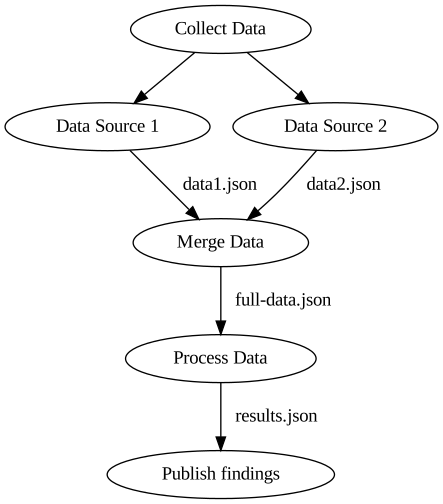
From a high level perspective this simple workflow is a valid template for many security tasks: a workflow consists of individual workflow steps (nodes in the graph), each one representing one activity to be performed.
In this example we collect data from two systems, merge the two collected data sets (data1.json, data2.json) into one large data set (full-data.json) and then process this data. If there are any findings (results.json) then we want to publish those, e.g. to a SIEM or an alerting system.
This workflow has some inherent properties:
-
We are collecting data from two different data sources. Those two steps are independent of each other and can therefore be executed in parallel.
-
Data collection has to be completed before data processing can be started. Similarly, publishing of findings only occurs after data processing has been completed.
-
When a step is finished it provides an output file that can be used as input in another step.
-
Each step executes automation logic that performs the required actions
So what is the best approach to implement a workflow that fulfills these properties? Use a workflow orchestration engine!
Argo Workflows
Argo Workflows (Argo WF) is the foundation for building our security automation platform. Argo WF is a Kubernetes native Workflow orchestration engine. Not to be confused with ArgoCD that is a popular continuous delivery tool that is built on top of Argo WF.
Info
There are also other workflow orchestration engines out there that can be used instead of Argo WF. Examples are Tekton (also Kubernetes based), “classical” orchestration engines like Apache Airflow or n8n, or as-a-service offerings such as AWS Step Functions, GCP Workflows, Tines, etc.
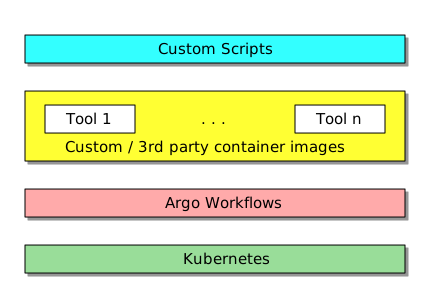
With Argo Workflows our software stack consists of the following components:
-
A Kubernetes cluster that provides the compute capacity where our tasks (=workflows) can be executed
-
Argo Workflows that is running on top of Kubernetes. With Argo WF, every workflow step is executed inside a container.
-
This implies we need container images that contain all the tools required for our security automation
-
Custom scripts, executed inside these container images, that use these tools to implement the actual automation logic
This software stack is visualized in the diagram below.
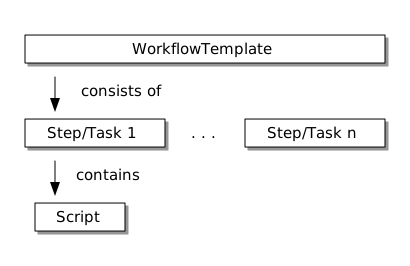
We have previously defined that security automation tasks can be modeled as workflows. Argo WF provides various Kubernetes objects that can be used to implement workflows:
-
The workflow logic has to be implemented in the WorkflowTemplate that defines the individual workflow steps (called tasks) that exist in a workflow [3]
-
Each workflow step (task) contains the automation logic that has to be specified in a script field of each step
-
Each step is executed inside a container
-
The input/output files for each step are specified as Artifacts
-
Input parameters can be provided to the
WorkflowTemplatethat can be propagated to the tasks where they can be used in the scripts
This is also shown in the diagram below.
You might want to read the Argo WF Core Concepts page for more in-depth information.
Launching Workflows
We have to differentiate between the WorkflowTemplate that defines the workflow structure and it’s automation logic and how a workflow is actually launched.
A workflow can be manually launched in Argo by defining a workflow file and then launching the workflow using the Argo CLI.
To regularly launch a workflow based on a time based trigger you create a CronWorkflow where you define a time schedule using standard cron syntax.
Event based triggers are not possible with vanilla Argo WF but can be supported with Argo Events that integrates nicely with Argo WF.
The various ways of launching workflows are illustrated below.
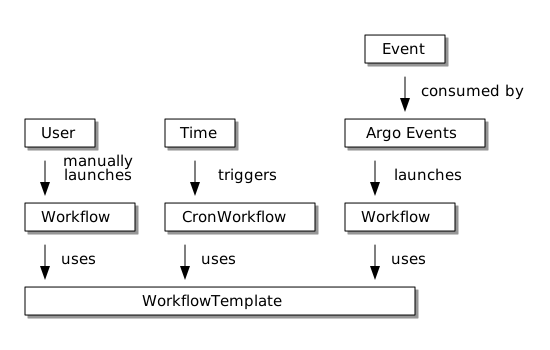
The WorkflowTemplate is always needed, as it contains the automation logic. When and how a workflow is executed is defined separately.
Deploying Argo WF
So how to install Argo Workflows?
We assume that you already have a Kubernetes cluster available. This can be a managed cluster (AWS EKS, Azure AKS, GCP GKE) or a self-managed cluster.
Argo WF itself can be deployed using a Helm chart; the community chart is sufficient for an initial deployment. You will have to provide an artifact repository (artifactRepository key in the chart). You can use AWS S3, GCP GCS, etc. for this. This repository is used for storing the output artifacts and the log output of each workflow step.
You will want to use at least two Kubernetes namespaces for the deployment:
-
One namespace for the deployment of Argo Workflows (server + controller) itself
-
At least one additional namespace where the actual workflows will be executed
Assuming you are deploying on an already existing K8S cluster on AWS, GCP or Azure, you should be able to have Argo WF up and running in ~1-2 hours.
Argo WF Web UI
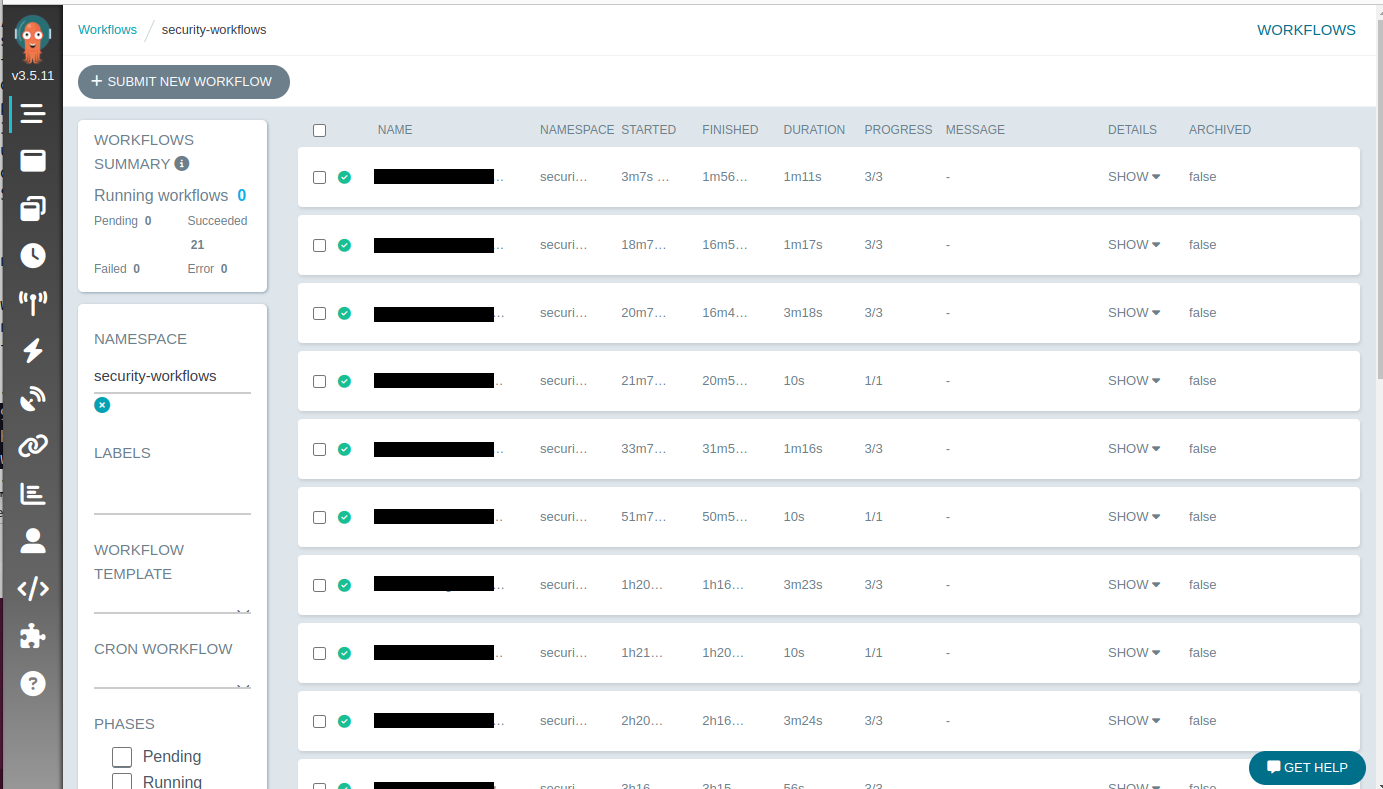
Deployed workflow templates and workflows can be viewed on the Argo WF web UI. Unless you have configured single-sign on in the Helm chart, you will have to obtain a temporary token in order to access the UI. This token can be obtained with the Argo CLI: argo auth token.
The screenshot below shows the Argo WF UI with some workflows that have been executed and completed within the last ~2.5 hours. These workflows are relatively short, with a maximum duration of 3.5 minutes.
Scalability
How many workflows can we launch within a certain time window? How much latency can we expect when launching a large number of workflows?
There are two aspects to consider: first, the Argo Workflows controller manages the workflow lifecycle (K8S pod creation, scheduling, and cleanup). The Kubernetes control plane is then responsible for running and scheduling the containers across worker nodes.
The Argo WF relevant metrics are:
-
Workqueue depth: workflows that have not yet been reconciled. The smaller the depth, the better.
-
Workqueue latency: the average time a workflow is waiting in the workqueue. A lower number is better.
When deployed with default settings, Argo WF can launch 270 workflows per minute without problems.
Once you start launching 300 workflows / min the workqueue depth starts increasing. A consequence of this is that the workqueue latency will also increase.
With some simple fine tuning (increasing the number of workers in the controller) you can launch up to 810 workflows / min while keeping the workqueue depth and latency low.
Going beyond that requires horizontal and/or vertical scaling. Vertical scaling means assigning more CPU and memory to the controller. What usually scales better is sharding (=horizontal scaling) where you deploy multiple controller instances. This will allow you to run up to 2100 workflows / min. The K8s API Priority and Fairness (APF) limits are then becoming a problem.
If you want to scale beyond that then you will have to shard across K8S clusters, meaning that you have multiple Argo WF deployments that are independent of each other.
The numbers presented above are from a post in the Cloud Native Operational Excellence blog where you can find more detailed benchmarking information.
Summary
The goal of this post was to introduce Argo Workflows as the foundation for building a security automation platform. Summarized, the key concepts are:
-
Tasks that you want to automate can be modeled as workflows
-
You can use a workflow orchestration engine like Argo Workflows to implement these workflows
-
Workflows can be triggered manually, by a time based schedule or an external event
-
When using a Kubernetes native workflow orchestration engine, automation logic is executed inside containers
In case all of this sounded too abstract: the next blog posts will introduce implementation examples for some tasks that can be automated. We will start with a relatively easy example, then introduce a more complex workflow and finally show how to implement event driven automation with Argo Events.